YouTube
Creative Commons videos on YouTube: how to find them, credit them and save a copy
Use YouTube's Creative Commons filter, check the licence label, write the credit line, and learn what a CC BY tag does and does not cover.
A YouTube Premium download plays only inside YouTube and expires. A real MP4 plays anywhere. See the limits, the rules and which one fits you.
A YouTube Premium download is a copy you can watch only inside YouTube, signed in with the same account, and it expires if you do not reconnect. A real MP4 file plays in any player and does not expire. Premium is the official route. Saving a file needs permission.
You pay for YouTube Premium and you can tap Download. So why do people still look for a way to get a video as a file? Because the two things are not the same. This page sets them side by side, with the numbers from YouTube's own help pages, so you can see which one fits what you need. If a Premium download looks soft, read how to check a file's bitrate before changing the app's quality setting.
A Premium download is something you watch inside YouTube. A real file is something you own and can open anywhere. YouTube's help pages say Premium downloads sit in the Downloads section and play while you are signed in, and they do not describe a way to take the video out of YouTube.
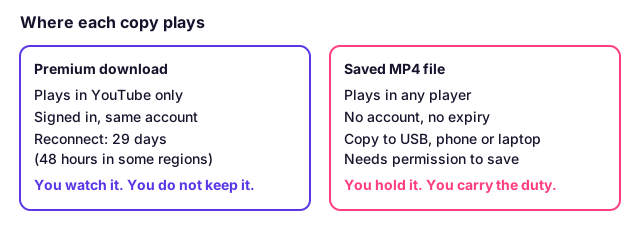
| Question | Premium download | Saved MP4 file |
|---|---|---|
| Where does it play? | In YouTube, signed in | In any player that opens MP4 |
| Does it expire? | Yes, if you do not reconnect | No |
| Can you copy it to a USB stick? | Not described by YouTube | Yes |
| Do you need a Premium account? | Yes | No |
| Can you edit or play it in a presentation? | No | Yes |
| Is it allowed by YouTube's terms? | Yes, it is YouTube's own feature | Only with permission to save the video |
Read the last row first. It is the part many guides skip, and it decides which column you can use.
On a computer it lasts up to 29 days. YouTube's computer page says "Downloaded videos can be played offline for up to 29 days", and after that you need to reconnect the device to the internet. Desktop downloads work in Chrome, Edge, Firefox and Opera.
The phone page gives a different number. It says downloads play for "up to 48 hours" in most places, and non-music videos in some countries can play for up to 29 days without a connection. You then reconnect at least once in that window.
Some web guides say 30 days. YouTube's own pages say 29, so use 29 and expect it to be shorter on a phone in some regions. The number is shown in the table below.
| Where you download | Offline period | Source page |
|---|---|---|
| Computer (Chrome, Edge, Firefox, Opera) | Up to 29 days | Computer help page |
| Phone or tablet, most regions | Up to 48 hours | Mobile help page |
| Phone or tablet, some countries, non-music | Up to 29 days | Mobile help page |
The mobile page also says you cannot download more if less than 5% of your storage is left, and that you must be signed in.
No, and YouTube does not offer a way. Its pages say downloads appear in the Downloads section and need a signed-in Premium account to play. They never call the download a file, and they never describe copying it out. So a Premium download will not go onto a USB stick, into PowerPoint or into a video editor.
This is why the choice matters for some jobs. A teacher who wants a clip on a classroom computer with no internet can use Premium only if that computer is signed in to the Premium account. The class guide covers that case in full: does YouTube Premium work offline in a classroom.
A real file gives you freedom from the account and the clock. An MP4 plays in your phone's gallery, in a presentation, on a TV with a USB port and in an editor, with no expiry. If the picture and the sound are one file, it also plays the same everywhere.
For some uses, that is the whole point. You may want your own old uploads as a backup, which the guide on downloading your own YouTube videos covers. You may need a talk you have a licence for on a laptop that is never online. Or you may want audio or a transcript, which a Premium download does not give you.
A file is not always the size you hope for. Quality depends on what YouTube keeps for that video, and a sharp 4K label does not always mean a sharp file. Read why your download is only 720p before you judge a result.
It costs you a decision about permission. YouTube's terms say you may not download any part of the service or its content unless the service allows it, or YouTube and the rights holders give written permission, or the law allows it. Premium's offline button is the service allowing it. A file saved another way is not.
That does not mean a file is always off limits. It means you should ask first whether you have a reason that covers it: your own upload, a Creative Commons or other licence that allows copies, or a written yes from the owner. Copyright law is separate from the terms and differs by country, so check yours. The page on whether it is legal to download videos lays out the three rules apart.
Our scope is simple. We do not help with private videos, age-restricted videos, anything behind a login, paywalled or DRM-protected content, or with getting around a limit. A link must be public or unlisted; which privacy settings can be saved is set out in a table.
If you do have permission, the YouTube video downloader on this site takes a public link and gives you a file. Its limits are 3 hours of video and 1 GB per file.
Choose Premium when you only need to watch on your own signed-in devices. Choose a file when the video must play where YouTube cannot, and you have permission. Often the honest answer is Premium for your own viewing, and a file only for the few videos you own or are licensed to keep.
| You want to... | Better route | Why |
|---|---|---|
| Watch on a flight on your own phone | Premium download | Official, simple, no permission question |
| Play a video on a classroom PC that is never online | File with permission, or Premium on a signed-in PC | Premium needs sign-in on that PC |
| Keep a backup of your own upload | File | You own it, and it has no expiry |
| Edit or cut a clip | File with permission | YouTube describes no way to open a Premium download in an editor |
| Listen on a device with no YouTube app | File with permission | Premium plays only in YouTube |
| Watch after you cancel Premium | File with permission | Premium downloads need an active, signed-in account |
If you are unsure, start with Premium. It never asks you to think about permission, and it is free of the problems a file can have: a format your player will not open, or a link that fails.
Guides disagree because the numbers differ by device and region, and because many were written to sell a tool. YouTube's mobile page says 48 hours in most places and 29 days in some; its computer page says 29 days. A guide that quotes one number for all devices is half right.
Many ranking pages also come from companies that sell downloaders. They have a reason to play down what Premium does. We run a downloader too, so weigh us the same way: every Premium fact here comes from YouTube's help pages read on 2026-11-14. If YouTube changes its pages, the numbers above will change, so check the sources below before you plan something that depends on them.
One more difference: some posts claim you can turn a Premium download into a file. YouTube's pages say no such thing, and we do not describe any method that works around the app.
YouTube's help pages do not describe it as a file you can move. They say you watch it in the Downloads section of YouTube while signed in. Treat it as a copy that belongs to the app, not as an MP4 you can open in other programs.
On a computer, YouTube says up to 29 days before you must reconnect. On the phone help page, it says up to 48 hours in most places and up to 29 days for non-music videos in some countries. The number depends on your device and region.
YouTube's help pages describe no way to do this. The download plays in YouTube while you are signed in. If you need a file that moves between devices, you need a real file that you have permission to save.
Yes. YouTube says computer downloads work in Chrome, Edge, Firefox and Opera. They still play inside YouTube in that browser while you are signed in with the Premium account.
The usual cause is that the device did not reconnect in time. YouTube says you must reconnect after the offline period ends. Other causes are signing out or the video no longer being available for offline play.
No. Downloads made with YouTube's own offline feature are allowed by the service. YouTube's terms forbid downloading content in other ways unless YouTube and the rights holders give written permission, or the law allows it.
It is different, not better. Premium is the official route and gives offline viewing inside YouTube. A file gives you something that plays anywhere, but you must have permission to save that video, such as your own upload or a licence that allows copies.
Use YouTube's Creative Commons filter, check the licence label, write the credit line, and learn what a CC BY tag does and does not cover.
Age-restricted YouTube videos need a signed-in adult, so a link downloader only gets a sign-in message. Why it happens and what you can do instead.
Unlisted YouTube videos open for anyone with the link, so a link downloader can save them. Private and members-only videos cannot be saved. Here is why.
Four ways to show a YouTube video in class with no internet: Premium offline, a hotspot, a USB file and a licensed library. What each needs, and the rules.
First published . Written and checked by the Raptor Downloader team (how we write and check guides). Download only videos you own or have permission to use. Terms · Copyright and takedowns