YouTube
Creative Commons videos on YouTube: how to find them, credit them and save a copy
Use YouTube's Creative Commons filter, check the licence label, write the credit line, and learn what a CC BY tag does and does not cover.
Unlisted YouTube videos open for anyone with the link, so a link downloader can save them. Private and members-only videos cannot be saved. Here is why.
An unlisted YouTube video can be saved with its link, because YouTube says anyone with the link can see and share it. A private video cannot, because only the owner and people they choose can open it while signed in. Members-only videos work the same way as private ones.
Someone sent you a YouTube link and you want a copy, or you set a video to "unlisted" and wonder who can open it. The answer depends on one thing: does YouTube show the video to a person who is not signed in? This page shows where each privacy setting falls, what a link downloader can and cannot do, and the old unlisted links that quietly stopped working.
Yes. An unlisted video can be saved from its link, because YouTube shows it to anyone who has that link. YouTube's own help page says it plainly: "Unlisted videos and playlists can be seen and shared by anyone with the link." It adds that the people you share it with "don't need a Google Account" to watch.
A link downloader works from the same position as such a viewer. It opens the link, sees what a visitor sees, and offers the qualities YouTube serves. So the steps are the same as for a public video:
v=.Two limits still apply to our service: three hours of video and 1 GB per file. A long unlisted recording, such as a full-day webinar, may be refused for that reason and not because of its privacy setting.
A note on proof. On 2026-11-14 we checked the live service: it reports YouTube as available. We could not run an unlisted test video through our engine that day, so this page rests on what YouTube's help page says about unlisted links and on how our tool behaves for any link a signed-out viewer can open. If an unlisted link fails for you, the error guide shows what each message means.
A private video cannot be saved from a link, because YouTube never shows it to someone who is not signed in as an allowed person. YouTube says private videos "can only be seen by you and whomever you choose." The owner picks those people by email address in YouTube Studio.
A link does not help. Even the owner's own private link shows an error to a visitor who is signed out or signed in as a different account. A website downloader has no account at all. We never sign in for you, and we do not ask for your Google login. That is a choice: a downloader that held your login could act as you, and no download website should ask for it.
When you paste a private link, our tool says: "This video is private or needs a login, so the site will not show it to us." That message is the whole story. There is nothing to retry, and refreshing will not change it.
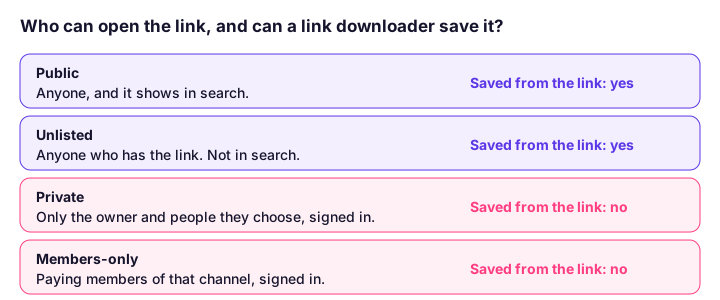
The three settings differ in who can watch, who can find the video and whether comments work. The table below is built from YouTube's help page.
| Public | Unlisted | Private | |
|---|---|---|---|
| Who can watch | Anyone | Anyone with the link | Only you and people you choose, signed in |
| Google Account needed to watch | No | No | Yes |
| Shows in YouTube search | Yes | No, unless added to a public playlist | No |
| Shows on the channel's Videos tab | Yes | No | No |
| Comments | Yes | Yes | No |
| Can a link downloader save it | Yes | Yes | No |
The last row is ours, not YouTube's. It follows from the rows above it: a downloader can save what a signed-out viewer can open.
One misunderstanding comes up again and again. Unlisted is not secret. The link is the only lock, and anyone who holds the link can pass it on. YouTube says so itself: "Anyone with the link can also reshare it." If a video must stay between a few named people, use Private, not Unlisted.
Members-only videos behave like private ones. YouTube shows them only to signed-in people who pay that channel for membership, so a link alone opens nothing for a downloader. Age-restricted videos are a third case: YouTube asks the viewer to sign in and confirm their age first, which is why age-restricted videos will not download.
Our tool names each case so you are not told the wrong thing. A members-only video gets a message that it is only for the channel's paying members. An age-restricted video gets a message that it needs a signed-in adult. Neither is a fault on our side, and neither is a reason to hunt for a workaround. We do not advise getting around a login, a paywall or an age check.
If an old unlisted link now shows "private," YouTube changed it. Starting on 23 July 2021, YouTube made unlisted videos uploaded before 1 January 2017 private, unless the owner opted out. It called this a security update to unlisted links, which it redesigned in 2017. Viewers who had the old link "can no longer watch or share it," and embeds stopped working.
This matters for both sides:
Videos uploaded on or after 1 January 2017 were not changed.
Use YouTube Studio. It works for a video you uploaded in any privacy setting, because you are signed in as its owner. YouTube's steps are: sign in to YouTube Studio, select Content, open the video's Menu (the three dots) and select Download. YouTube says the file is "720p or 360p, depending on the video size," and the button is limited per video per day.
That means a private video of your own is not lost, but it is saved through YouTube's own button, not a link downloader. Our guide to downloading your own YouTube videos also covers Google Takeout for every upload at once, and why a Studio file is smaller than the one you uploaded.
If you want to keep the privacy setting while sharing with a few people, you do not need a copy at all. Add their email addresses to a Private video in Studio, or send the link of an Unlisted one.
You may only keep a copy if you have the right to. The link tells you the owner was willing to show you the video. It does not tell you they agree to copies, to uploading it somewhere else, or to using it in your own work.
A sensible rule is short:
YouTube's terms allow downloading only where YouTube offers a download button or the owner gives permission, and a downloader does not change who owns the video. For the wider picture, read is it legal to download videos. Do not use any method that claims to open a private video without the owner's say. It cannot work as promised, and the downloads that try it often ask for your Google login.
Ask what happens when you open the link in a window where you are signed out. If the video plays, it is public or unlisted, and a link downloader can save it. If YouTube asks you to sign in, or says the video is private, nothing but the owner can help. In that case message the owner and ask them to send the file, or to make the video unlisted for a short time.
Yes, with the link. YouTube says unlisted videos can be seen and shared by anyone with the link, and viewers do not need a Google Account. A link downloader reads the video the way a viewer without an account does. If the video is not yours, ask the owner before you keep a copy.
No. YouTube says private videos can only be seen by you and whomever you choose. A website downloader never signs in to your account, so YouTube shows it nothing. If the video is yours, use YouTube Studio's Download button.
Unlisted means anyone with the link can watch. Private means only people the owner picks, signed in, can watch. Unlisted videos can have comments; private videos cannot. Neither one shows in YouTube search unless an unlisted video is added to a public playlist.
Not by searching. YouTube keeps unlisted videos out of search results and off the channel's Videos tab. The one exception YouTube names is a public playlist: if someone adds your unlisted video to one, it can show up there.
YouTube made unlisted videos uploaded before 1 January 2017 private, starting on 23 July 2021, unless the owner opted out. Anyone who had the old link lost access. The owner can switch the video back to legacy unlisted to bring the link back.
For a downloader, yes. Members-only videos are shown only to signed-in paying members of that channel, so a link alone opens nothing. Our tool tells you the video is for members, rather than saying it is private.
Yes, from YouTube Studio. Sign in, choose Content, open the video's Menu and select Download. You get an MP4 at 720p or 360p. This works for your own videos in any privacy setting, one at a time.
The link does not give you the right to keep or share the video. The owner chose to share it by link, not to give copies away. Save videos you made, or ones whose owner has said yes. Copyright and YouTube's terms still apply.
Use YouTube's Creative Commons filter, check the licence label, write the credit line, and learn what a CC BY tag does and does not cover.
Age-restricted YouTube videos need a signed-in adult, so a link downloader only gets a sign-in message. Why it happens and what you can do instead.
A YouTube Premium download plays only inside YouTube and expires. A real MP4 plays anywhere. See the limits, the rules and which one fits you.
Four ways to show a YouTube video in class with no internet: Premium offline, a hotspot, a USB file and a licensed library. What each needs, and the rules.
First published . Written and checked by the Raptor Downloader team (how we write and check guides). Download only videos you own or have permission to use. Terms · Copyright and takedowns