YouTube
Why age-restricted YouTube videos won't download, and what to do instead
Age-restricted YouTube videos need a signed-in adult, so a link downloader only gets a sign-in message. Why it happens and what you can do instead.
Use YouTube's Creative Commons filter, check the licence label, write the credit line, and learn what a CC BY tag does and does not cover.
To find Creative Commons videos on YouTube, search your topic, open Filters and choose Creative Commons under Features. These videos carry the CC BY licence, so you may reuse and change them, even for money, if you credit the creator. The label does not cover music, clips or logos inside the video.
You need a video you may reuse: for a class, a school film, a talk or a small business clip. YouTube has a licence for that, called Creative Commons. This page shows how to find those videos, what you may do with them, how to write the credit, and where the label stops. Reading the label is quick. Reading its limits is what keeps you out of trouble.
Search your topic on YouTube, click Filters, and under Features choose Creative Commons. YouTube's help page says the same: select "Creative Commons" from the advanced search filters. You can also check a video's description for licence information.
Then do one more step. Open the video and read the licence line below the description. A reusable video says "Creative Commons Attribution license (reuse allowed)". Every other video says "Standard YouTube License", and that one is not open for reuse.
A few habits save time:
On YouTube, the Creative Commons choice means the CC BY licence. YouTube says that other creators can reuse the work "subject to the terms of the CC BY license". The licence from Creative Commons is plain: you may copy and share the video in any medium or format, and adapt it, for any purpose, including commercial use. The creator cannot take these freedoms back while you follow the terms.
| You want to | Allowed under CC BY? | What you must do |
|---|---|---|
| Show the video in class or at a meeting | Yes | Credit the creator on screen or in your notes |
| Cut it, subtitle it or remix it | Yes | Credit the creator and say you changed it |
| Use it in a paid product or an ad | Yes, commercial use is allowed | Credit the creator; do not suggest they endorse you |
| Remove the creator's name | No | Keep the credit |
| Use a song or clip inside it | Not covered by the label | Check who owns that part |
Notice the last row. The label tells you about the uploader's own work. It says nothing about everything else you can see or hear in the picture.
Give four things: title, author, source and licence. Creative Commons calls this TASL. Its attribution page defines each part as a question: what is the work called, who allows you to use it, where can people find it, and how can you use it. YouTube's own help page asks for the same set: the work's title, author, source URL and licence information, shown for example as a text overlay or a voiceover.
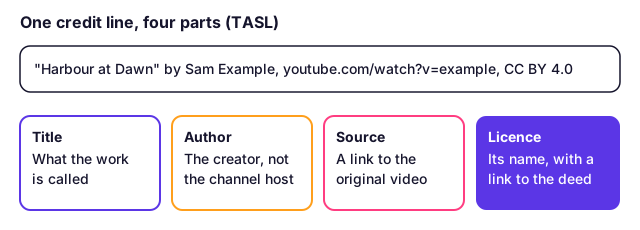
A template you can copy:
"Title of the video" by Creator Name, https://www.youtube.com/watch?v=VIDEOID, licensed under CC BY 4.0 (https://creativecommons.org/licenses/by/4.0/). Changes made: shortened to 40 seconds.
Some points that trip people up:
The licence lets you copy the video. YouTube's terms are a separate agreement, and the text we read does not mention Creative Commons. That is the point most guides skip.
Here are the two rules side by side:
| Rule | Who made it | What it says about copies |
|---|---|---|
| CC BY 4.0 licence | The creator | You may copy and share the video in any medium or format, with credit |
| YouTube Terms of Service | YouTube | You may not download content except as the service expressly authorises or with prior written permission from YouTube |
The licence settles the creator's copyright. It does not rewrite the contract between you and YouTube, and the terms we read have no Creative Commons exception. So this is a risk you choose, not a clear yes. Breaking a site's terms is usually a contract matter, such as a closed account, not a crime. Our page on whether it is legal to download videos sets out the three layers: law, licence and terms. This is general information, not legal advice.
If you decide to keep a copy, do it for a good reason: a class with no internet, an edit you must finish offline, or a backup of a clip you have credited. Our YouTube video downloader works with public links. It cannot open private videos or anything behind a sign-in, and it will not remove DRM. Files are limited by our settings to three hours and 1 GB. If the video is yours, YouTube's own tool is better: see how to download your own YouTube videos.
Keep the credit with the file. Save the video's URL and licence line in the file name or in a text note, because the file alone will not tell you where it came from.
The label covers what the uploader owns, and only if the uploader really owned it. Check these four cases before you publish anything.
Also remember that a licence cannot be undone for the copies you already hold. Creative Commons says its licences are not revocable once granted unless there has been a breach. The creator can stop sharing the video, but your copy stays valid on the licence terms. That is why keeping the URL, the date and the licence line matters.
Creative Commons is the safest road to reusing other people's video. It is still a road with rules, and the credit line is the toll.
Search for your topic, click Filters, and under Features choose Creative Commons. Then open a video and check its description: it should say Creative Commons Attribution license (reuse allowed). Videos that say Standard YouTube License are not open for reuse.
Yes, under CC BY 4.0 you may share and adapt the video for any purpose, including commercial use, without paying. The one price is credit: you must name the creator, link to the licence and say if you changed the video.
Yes. CC BY is the Attribution licence. Give the title, the author, a link to the source and the licence name with a link. Credit the creator, not only the website or channel that hosted the video.
The licence lets you copy the video, because it permits sharing in any format. YouTube's own terms are a separate agreement and do not mention Creative Commons. They limit downloading to what the service allows or written permission. This is general information, not legal advice.
Not automatically. The CC BY label applies to what the uploader owns. A song, film clip or logo inside the video may belong to someone else and stay under its own rules. Content ID can still flag it. Check the sound separately.
Creative Commons says licensors need all necessary rights before they apply a licence, and should not license material they do not own. A wrongly tagged video gives you no real permission. Watch for re-uploads of other people's work.
Not for copies you already have. Creative Commons says its licences are not revocable once granted unless there has been a breach. The creator may stop sharing the video, but you may keep using your copy on the licence terms.
No. Public domain has no owner to credit. A Creative Commons video still has an owner, who keeps the copyright and gives you set permissions. CC BY always asks for credit.
Age-restricted YouTube videos need a signed-in adult, so a link downloader only gets a sign-in message. Why it happens and what you can do instead.
A YouTube Premium download plays only inside YouTube and expires. A real MP4 plays anywhere. See the limits, the rules and which one fits you.
Unlisted YouTube videos open for anyone with the link, so a link downloader can save them. Private and members-only videos cannot be saved. Here is why.
Four ways to show a YouTube video in class with no internet: Premium offline, a hotspot, a USB file and a licensed library. What each needs, and the rules.
First published . Written and checked by the Raptor Downloader team (how we write and check guides). Download only videos you own or have permission to use. Terms · Copyright and takedowns