YouTube
Creative Commons videos on YouTube: how to find them, credit them and save a copy
Use YouTube's Creative Commons filter, check the licence label, write the credit line, and learn what a CC BY tag does and does not cover.
Age-restricted YouTube videos need a signed-in adult, so a link downloader only gets a sign-in message. Why it happens and what you can do instead.
Age-restricted YouTube videos won't download because YouTube shows them only to signed-in viewers aged 18 or over, and a link downloader is neither. It is sent a sign-in page, not the video. We do not sign in or get around the age check. Watch the video on YouTube, or ask its owner for the file.
You pasted a YouTube link and the download stopped with "Sign in to confirm your age". This page explains why that happens, why no downloader website can fix it, and what you can do that is allowed and safe.
They do not download because YouTube only plays them for a signed-in adult. YouTube's own help page says: "Age-restricted videos are not viewable to users who are under 18 years of age or signed out." A downloader website reads the video from a link. It has no account, so it is "signed out" by definition.
A video can be age-restricted even when it breaks no rules. YouTube says content may be restricted when it is not appropriate for viewers under 18.
The same page says age-restricted videos cannot be watched on most third-party websites. If you open one inside someone else's page, you are sent to YouTube and asked to sign in as an adult. A downloader is a third-party website, so it meets the same wall.
We tested this on 15 November 2026 from our own server, signed out, using the same engine the website uses (yt-dlp 2026.10.26). We read two YouTube links one after the other.
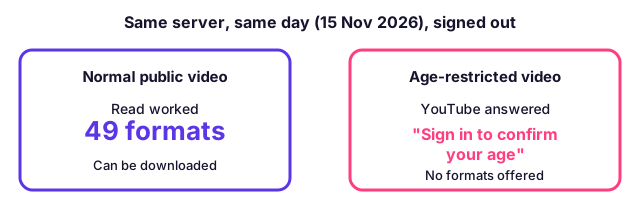
| Link | What YouTube returned | Result |
|---|---|---|
| A normal public video | Normal video information | 49 formats offered; it can be downloaded |
| An age-restricted video | "Sign in to confirm your age. This video may be inappropriate for some users." | No formats; nothing to download |
The server reached YouTube fine in both cases. That is the important point. The refusal on the second link was not about our server or our connection. It was about the video.
No, and mixing them up sends people the wrong way. They look alike because both say "sign in". They have different causes and different answers.
| "Confirm your age" | "Confirm you're not a bot" | |
|---|---|---|
| What it is about | The video | The network address of the request |
| Who sees it | Anyone who is signed out, on any connection | Mostly data-centre servers and busy connections |
| Does another video work? | Yes, normal videos work | Often none work |
| Does waiting help? | No | Sometimes |
| Does it help to use a home connection? | No | Often yes |
If your message mentions "not a bot", read what that message actually means instead. Waiting, a new connection or a different device can fix that one. None of them fixes the age check.
The only technical way to read an age-restricted video is to present a signed-in adult account. Some tools offer to do this by borrowing the cookies from your browser. We do not do it, and we advise against it, for three reasons.
Some desktop programs ask you to sign in to your own account inside the program. That is a choice between you and that program, and it carries the account risk above. We do not recommend it as a fix.
Start with what you actually need. Most people want one of three things, and each has an allowed route.
| You want to... | Route that works | Notes |
|---|---|---|
| Watch the video | Open it on YouTube, signed in as an adult | Free, nothing to install |
| Watch it without a connection | YouTube's own offline feature, inside the YouTube app | Needs YouTube Premium; it stays in the app and is not a file |
| Keep your own upload | Download it from YouTube Studio | Your own videos need no workaround |
| Use a clip in class or a project | Ask the owner for the file or for permission | The owner can send the original |
| Save a different, public video | Paste the link into the downloader | Videos without an age gate work as normal |
YouTube's help page on offline viewing explains what Premium offline downloads are and where they can be played. They are not a normal video file, which is covered in what a Premium download is and is not.
If the video is yours, you do not need to fight the age check at all. Read how to save your own YouTube videos for the ways YouTube gives you the original.
Open it on YouTube while signed in as an adult. YouTube's help page says signed-in viewers over 18 can see whether a video is age-restricted below the description. If you open the link in a private window and YouTube asks you to sign in before it plays, the video is age-restricted.
Creators have a simple check too. In YouTube Studio the Content page has an "Age-Restriction" filter, and a restricted video shows "Viewable by 18+" under Notices.
Then fix the label, not the downloader. Check the notice in YouTube Studio and look in YouTube's help centre for its review option. Once the restriction is lifted, the video is no longer behind the age check.
Age-restricted videos are public in one sense: any adult can watch them after signing in. Private and members-only videos are different, because only chosen accounts can open them. All three need a login, so a link alone opens nothing. Our tool names each case so you are not told the wrong thing. You can read how members-only videos behave like private ones.
| Kind of video | Who can watch | Can a link downloader save it? |
|---|---|---|
| Age-restricted | Signed-in adults | No, it needs a signed-in adult account |
| Members-only | Paying members of that channel | No |
| Private | Only people the owner invites | No |
YouTube's Terms of Service say you may not download content except as YouTube expressly authorises, or with permission from the rights holder. A video being free to watch does not make it free to copy. This page is about why a download fails. It is not advice to copy videos you have no right to keep.
When you paste an age-restricted link, the site stops and tells you plainly that the video needs a signed-in adult, and that we never sign in. It does not show a wrong message such as "make the video public". The rest of a queue carries on, so one restricted video in a long list does not stop the others.
Public YouTube videos, Shorts and cover pictures work from the website without any sign-in. Open the YouTube video downloader to try a link that does not have an age gate.
YouTube shows an age-restricted video only to people who are signed in and 18 or older. A downloader that works from a link is not signed in, so YouTube answers with "Sign in to confirm your age" and no video file.
It means the video is marked as not suitable for viewers under 18, and YouTube will only play it for a signed-in adult. The message is about the viewer's account. It is not about your internet connection.
No. The bot message is about the network address a request comes from. The age message is about the account. A normal public video can work from the same server in the same minute that an age-restricted one is refused.
No. The age check does not expire. Trying again, using another browser or switching to a VPN gives the same answer, because the missing thing is a signed-in adult account.
We advise against it. A sign-in cookie works like a key to your whole Google account, and the yt-dlp project warns that using an account for downloading can get the account banned.
Open it on YouTube while signed in as an adult. YouTube's help page says signed-in viewers over 18 can see whether a video is age-restricted below the description. If YouTube asks you to sign in first, it is age-restricted.
Yes, and without any downloader. In YouTube Studio you can download your own uploaded video from the Content page. This does not need a workaround.
No. We never sign in to YouTube, so the site tells you plainly that the video needs a signed-in adult. Public videos without the age gate download as normal.
Use YouTube's Creative Commons filter, check the licence label, write the credit line, and learn what a CC BY tag does and does not cover.
A YouTube Premium download plays only inside YouTube and expires. A real MP4 plays anywhere. See the limits, the rules and which one fits you.
Unlisted YouTube videos open for anyone with the link, so a link downloader can save them. Private and members-only videos cannot be saved. Here is why.
Four ways to show a YouTube video in class with no internet: Premium offline, a hotspot, a USB file and a licensed library. What each needs, and the rules.
First published . Written and checked by the Raptor Downloader team (how we write and check guides). Download only videos you own or have permission to use. Terms · Copyright and takedowns