YouTube
Creative Commons videos on YouTube: how to find them, credit them and save a copy
Use YouTube's Creative Commons filter, check the licence label, write the credit line, and learn what a CC BY tag does and does not cover.
Four ways to show a YouTube video in class with no internet: Premium offline, a hotspot, a USB file and a licensed library. What each needs, and the rules.
To show a YouTube video in class without internet, put the video on the classroom computer before the lesson. Four routes work: YouTube Premium's offline mode, a phone hotspot, a file you have permission to save, or a video your school already licenses. Test the room first, and check your school's rules.
The wifi in your classroom is slow, blocked or gone, and a video is the best part of tomorrow's lesson. A video that streams in the staff room can stall in front of thirty students. This page shows four ways to show a YouTube video in class without internet, what each one needs, the rules that apply, and a short test you can do before the bell.
The best way is to have the video on the classroom computer before the lesson, by a route you are allowed to use. Which route fits depends on your account, your school and who owns the video.
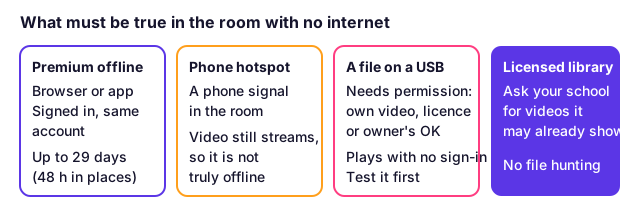
| Route | What you need | Works with no signal | Main limit |
|---|---|---|---|
| YouTube Premium offline | A Premium account, signed in on the classroom computer | Yes, for up to 29 days | Plays only while signed in with the same account |
| Phone hotspot | A phone with a signal in the room | No: the video streams | A weak signal gives the same stall |
| A saved file on a USB stick | A video you own, a licence that allows copies, or the owner's permission | Yes | Needs permission, and must be tested |
| School's licensed video library | Your school's subscription | Depends on the library | Only has what the school bought |
Read the table from the top. If your school already pays for Premium on a shared account, the first row is the least trouble. If nobody can use a Premium account, the third row needs a decision about permission, and the next sections cover it.
Yes, as long as the classroom computer stays signed in to the Premium account. YouTube's help page says computer downloads work in Chrome, Edge, Firefox and Opera. It also says "Downloaded videos can be played offline for up to 29 days", and then you must reconnect. In some countries and regions the limit is 48 hours instead. Premium downloads and a real file compared lists the period for each device.
Two parts of that page matter for a teacher:
On a phone or tablet, YouTube's mobile page says every step happens in the YouTube app. It also says you cannot download more when less than 5% of the device's storage is left, so clear space the day before. Plan to show the video from the same device, or from the same signed-in browser, that holds the download.
One more thing to know: you may hear that Premium limits you to one device. We did not find that on YouTube's two download pages, so we do not claim it. Check your own plan page before relying on a second computer.
A hotspot is a backup, not an offline plan. Your phone shares its mobile signal, and the classroom computer streams the video over it. If the room has no signal, the hotspot does nothing. If the signal is weak, the video buffers, which is the problem you were trying to avoid.
If you use a hotspot, open the video on the classroom computer before students arrive. Let it play for a minute. Choose a lower quality in the video's settings to use less data. Keep a second option ready in case the signal drops. A full class video can use a lot of your phone's data allowance, so check it first.
You can, but the permission question comes first, and it has two parts that do not depend on each other.
YouTube's terms. YouTube's Terms of Service say you may not "access, reproduce, download, distribute, transmit, broadcast, display, sell, license, alter, modify" content except as the service allows, or "with prior written permission from YouTube and, if applicable, the respective rights holders". So a download made outside YouTube's own features breaks the terms unless someone gave you permission. The usual consequence of a terms breach is action on your account, not a court case. Our article on the three rules a download touches explains law, licence and terms side by side.
Copyright law. This is your country's rule, and it is separate. In the United States, section 110(1) covers the "performance or display of a work by instructors or pupils in the course of face-to-face teaching activities" at a nonprofit educational institution, in a classroom or similar place devoted to instruction. For a film or other audiovisual work, the section does not apply when the copy "was not lawfully made", and the person responsible knew or had reason to believe that. Other countries have different school rules, and some have none. We are not lawyers and this is not legal advice.
Put together, these are the safest cases for saving a file:
For anything else, ask the owner to send you the file, or ask your school what its policy is. Some schools forbid saving any video from YouTube. If yours does, follow it.
If you are allowed to save a file, the YouTube video downloader reads a public video link and gives you the file. It does not sign in and it cannot save private videos, though an unlisted video opens from its link. The website handles files up to 1 GB and videos up to 3 hours, and the download button works for 30 minutes after it appears. It does not give you permission: you decide whether you have it.
Choose an MP4 with H.264 video and AAC sound. It is the type that plays in PowerPoint, in browsers and in most school players. The name .mp4 does not promise it: the box can also hold HEVC, VP9 or AV1, which some school computers cannot open.
Our article on which players open H.264, VP9 and AV1 has the full table. The short version for a teacher:
We could not measure file sizes for this page. Our test server was refused by YouTube on 13 November 2026 with its "Sign in to confirm you're not a bot" message. So we give no size or quality numbers here. Check the size shown in your own download before you copy it.
Three common ways work, and a good teacher has two of them ready.
Plan for the day the projector is a different one. Bring the adapter you need and know where the volume control is.
Yes, if any student reads the language better than they hear it. Captions help students who are deaf or hard of hearing, and students learning your language. A saved video does not always keep its captions.
If you are allowed to save the video, you can save its captions as a separate file. Our guide to SRT, VTT and TXT files says which to choose for a player. The YouTube transcript downloader saves the creator's captions when they exist. Automatic captions repeat every line when saved, so check them before students see them.
Run the whole lesson once in the real room. Most failures only show up there.
Ask your IT team. Many schools can allow one video, give you a copy they have approved, or point you to a licensed library. Do not use tricks to get around the filter: that can break school policy and put your account at risk. This page does not cover bypassing a school's blocks, a login or a paywall, and nothing here should be read that way.
Also be careful with videos that are not YouTube's to give: a film or a recorded TV show uploaded by someone who does not own it. The copy may not be lawfully made, and the classroom rule in section 110(1) does not cover that for audiovisual works.
Get the video onto the classroom computer before the lesson. Use YouTube Premium's offline mode, a file you have permission to save, or a phone hotspot as a backup. Then open it once in the real room, with the real screen and speakers, to check it works.
YouTube's terms allow downloading only through YouTube's own features or with written permission from YouTube and the rights holders. Copyright law is a separate question and differs by country. Ask your school first, and prefer videos you own or that carry a licence allowing copies.
Yes, if the classroom computer is signed in to the Premium account. YouTube says computer downloads work in Chrome, Edge, Firefox and Opera, play for up to 29 days before you must reconnect, and play only while signed in with the same account.
YouTube's help pages do not describe that. They say downloads play while signed in with the same account. Treat a Premium download as something you watch in YouTube on the signed-in device, not as a file to carry.
It depends on the country. In the US, section 110(1) of the copyright law covers displaying works in face-to-face teaching at a nonprofit educational institution, in a classroom. For films, the copy must have been lawfully made. This is not legal advice, so ask your school.
Use an MP4 with H.264 video and AAC sound. It opens in PowerPoint, most browsers and most school players. A file called .mp4 can hold other video types that some players refuse, so test it on the classroom machine.
Ask your IT team to unblock the video or to give you an approved copy. Do not use tricks to get around the school's filter. Many schools can allow a single video, or already hold a licensed library that has what you need.
Only if you saved them before class. Download the captions as an SRT or VTT file and load them in a player that reads subtitle files, or ask for the video with captions already in it. Check them in the classroom before the students arrive.
Use YouTube's Creative Commons filter, check the licence label, write the credit line, and learn what a CC BY tag does and does not cover.
Age-restricted YouTube videos need a signed-in adult, so a link downloader only gets a sign-in message. Why it happens and what you can do instead.
A YouTube Premium download plays only inside YouTube and expires. A real MP4 plays anywhere. See the limits, the rules and which one fits you.
Unlisted YouTube videos open for anyone with the link, so a link downloader can save them. Private and members-only videos cannot be saved. Here is why.
First published . Written and checked by the Raptor Downloader team (how we write and check guides). Download only videos you own or have permission to use. Terms · Copyright and takedowns