Quality & formats
Why your downloaded video is blurry even at 1080p: bitrate explained
A 1080p file can still look soft. We scored eight copies of one clip: bitrate decided sharpness as much as size. How to check yours and what helps.
HLS and DASH cut a video into short pieces and a playlist. What that means when you save one, with the pieces counted on real public links.
HLS and DASH are two ways a site streams video. The site cuts the video into short pieces, a few seconds each, and gives your player a list of them. The player fetches the pieces in order and can change quality on the way. To save the video, a tool must fetch every piece and join them into one file.
You pasted a link, and the video plays fine on the site. But behind that one video there is no single file. There are dozens of small pieces and a list that says what order they go in. This page explains HLS and DASH, the two methods that do this, and what it means when you want to save a video. The pieces also carry different amounts of data, and a size with too little looks soft, as our bitrate test of a blurry download shows.
HLS and DASH are the two common ways a site streams video over ordinary web servers. HLS stands for HTTP Live Streaming. DASH stands for Dynamic Adaptive Streaming over HTTP, and people also call it MPEG-DASH. In both, the site cuts the video into short pieces, called segments, and publishes a small text file that lists them.
MDN, the web developers' reference, puts the idea in one line: live streaming formats "generally allow adaptive streaming by breaking streams into a series of small segments and making those segments available at different qualities and bit rates." Your browser reads the list, fetches the first piece, starts playing, and keeps fetching the next ones while you watch.
The two methods came from different places:
An .m3u8 file is a list of web addresses, not a video. HLS has two kinds of list. A master playlist names the versions of the video, for example a small one and a large one. A media playlist belongs to one version and names its pieces in order. RFC 8216 says a media playlist "contains a list of Media Segments, which, when played sequentially" make up the video.
Two lines in that list matter to anyone saving a video:
#EXT-X-TARGETDURATION is the longest a piece may last. The RFC says it "specifies the maximum Media Segment duration."#EXT-X-ENDLIST means the list is finished. The RFC says it "indicates that no more Media Segments will be added." A list without that line can still grow. That is how a live stream works, and it is why a live stream is not yet a finished file.DASH does the same job with a file called an MPD, short for media presentation description. Wikipedia says it "describes segment information", such as timing, addresses, size and bit rate.
Sites split videos so that one video can play well on a fast line and on a weak one. The site makes the video at several qualities, and cuts each into short pieces. Your player checks how fast the pieces arrive. If they arrive slowly, it asks for the next piece at a lower quality. If they arrive fast, it goes up. MDN describes it the same way: if "it's not keeping up, we drop down to a lower bandwidth (and consequently lower quality) stream."
There are two more reasons. The pieces are plain files, so any ordinary web server or cache can deliver them. And the player can jump to the middle of a video by fetching only the pieces it needs.
Real videos are cut into a few dozen pieces, and a long one into thousands. On 14 November 2026 we read public links with our own engine, then opened the playlists it listed and counted the pieces. The table shows what we found.
| Link | Length | Method listed | Pieces in one playlist | Average piece |
|---|---|---|---|---|
| YouTube video | 213 s | HLS lists, plus plain files | 38 | 5.61 s |
| Dailymotion video | 106 s | HLS, two sizes | 9 | 11.8 s |
| Bluesky post | no length given | HLS, two sizes, plus one plain file | 5 | 5.95 s |
| Pinterest video Pin | 10.5 s | HLS, four picture sizes and one sound list | 6 | 1.75 s |
| TikTok video | 6 s | Plain files only | not split | not split |
| Twitch clip | 32 s | One plain file | not split | not split |
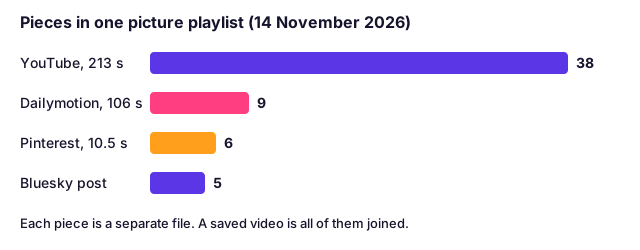
Three things stand out.
The piece length is the site's choice. It was about 6 seconds on YouTube and Bluesky, nearly 12 seconds on Dailymotion, and under 2 seconds on Pinterest. RFC 8216 only sets a maximum.
Every size is its own playlist. The YouTube video listed 15 HLS picture playlists, from 144p to 2160p, and each one had its own 38 pieces. The piece count was the same in each. In this video, a larger size did not mean more pieces. It meant bigger pieces.
Not every site splits. The TikTok video and the Twitch clip we read were listed as plain files, each one a whole video. A tool that only knows how to copy one file works there, and fails on a link that is split.
For a long video the arithmetic grows quickly. Our website takes videos up to 3 hours (max_duration in our config.py). At 5.61 seconds a piece, 3 hours is about 1,925 pieces for the picture alone. That is arithmetic from the YouTube result, not a count of a 3-hour video.
Many sites keep the sound as its own playlist, apart from the picture. RFC 8216 allows it: the sound can be listed as an alternative rendition. This saves the site from storing a copy of the sound inside every picture size.
We saw it on the Pinterest Pin. It listed one sound-only playlist and four picture playlists, and none of the picture playlists carried sound. The YouTube video listed 5 plain sound files beside its picture files. Dailymotion and Bluesky, in contrast, listed sizes with picture and sound already together (H.264 picture with AAC sound).
Your player fetches both lists and plays them in step, so you never notice. A tool that saves one list gives you a silent video. We explain how to spot that, and the fix, in why a downloaded video has no sound. It is also why some downloads stop at 720p or 360p when a tool cannot join the two.
To save a split video, a tool needs five steps. Saving the .m3u8 file does not do it, because that holds only the list.
That last step is why a good download looks the same as the video on the site. Our downloader does all five. On a Pinterest Pin, for instance, you pick a size and get one MP4 with AAC sound, as shown on our Pinterest video downloader page. The Dailymotion page explains why we had to add the joining step there, and the YouTube page shows how YouTube keeps its two streams apart.
If you save a split video and it will not play, the cause is often the pieces' format and not the splitting. Read why the .mp4 name does not tell you what is inside.
You do not need to know whether a link uses HLS or DASH. The steps are the same:
The website handles files up to 1 GB and videos up to 3 hours (max_filesize and max_duration in config.py). For longer videos, use the free Raptor Downloader app for Windows and Mac. If a download shows an error, our guide to every error message and its fix explains it.
We save only videos that anyone can watch without signing in. A split video is not a locked video: pieces that a public player fetches are the same pieces we fetch. But some video is protected with copy protection (DRM), and a playlist can point at pieces that only a licensed player can decode. We do not get around logins, paywalls, private settings or DRM, and videos saved inside streaming apps are out of scope.
A live stream is not a finished file either, because its list is still growing. This page is about finished videos.
Being able to fetch a piece is not a licence to reuse the video. Save your own videos and videos you are allowed to keep. Our guide on whether downloading a video is legal explains the rules. This is general information, not legal advice.
HLS is HTTP Live Streaming, a method Apple created and the IETF published as RFC 8216. The site cuts a video into short pieces and lists them in a playlist, usually a file ending in .m3u8. The player reads the list and fetches each piece in order.
Both cut video into pieces and list them in a small text file. HLS uses an .m3u8 playlist and DASH uses an MPD file. DASH is an international standard, ISO/IEC 23009-1, and HLS began at Apple. For someone saving a video the result is the same: many pieces that a tool must fetch and join.
Saving the .m3u8 file gives you only the list, not the video. A tool has to fetch every piece the list names and join them into one file. Paste the page link into our downloader and pick a size, and it does the fetching and joining for you.
It is a plain-text playlist. It holds no picture or sound. It names the pieces of a video, in order, and says how long each one lasts. If you open it in a text editor you will see lines of web addresses.
Safari plays HLS on its own. Other browsers play it through a small script on the page, and VLC opens an .m3u8 link directly. If you saved the video as one MP4 file instead, any player opens it.
Sites often keep the sound as a separate list from the picture. A tool that saves only the picture list gives you a silent file. Download the video again with a tool that fetches both and joins them.
A 1080p file can still look soft. We scored eight copies of one clip: bitrate decided sharpness as much as size. How to check yours and what helps.
MP4 is far smaller and sharper than GIF for the same loop. See our measured sizes, the 256-colour limit, and the few places that still need a real .gif.
A download is never sharper than the biggest copy the site kept. Measured on 56 videos: why you get 720p, what "4K" tools give you, and how to get the best.
SRT vs VTT vs TXT: what is inside each subtitle file, where each one works, how to convert them, and why YouTube's automatic captions repeat every line.
First published . Written and checked by the Raptor Downloader team (how we write and check guides). Download only videos you own or have permission to use. Terms · Copyright and takedowns