More sites
How to download a Vimeo video: the official button, and why it is sometimes missing
Vimeo has a Download button, but only when the owner turns it on. Where to find it, why it is missing, and what to do when it is. Checked 21 Nov 2026.
Copy a Telegram post link on desktop or phone, read what each part means, and see which link forms we tested and which fail. Measured on 22 November 2026.
To copy a Telegram post link, open the post and choose Copy Post Link on a computer, or Copy Link on a phone. A public channel's link looks like t.me/name/123 and ends with the post number. A link ending in only a name opens the whole channel, and t.me/c/ links work only for members.
You want the link of one Telegram post, to send to a friend, to keep, or to paste into a downloader. The menu is easy to find once you know its name, but the link has rules of its own. Some links open one post, some open a whole channel, and some work only for people who have joined. This page shows how to copy a Telegram post link on each device, what the parts of the link mean, and which forms we tested on 22 November 2026. The rules come from Telegram's own documentation, and the tests ran on our own download engine.
You copy a post link from the post's own menu: Copy Post Link on Telegram Desktop, Copy Link in the Android app. The wording below comes from the apps' open-source text files, which we read on 22 November 2026.
| Where | What you do | Wording in the app |
|---|---|---|
| Telegram Desktop (Windows, Mac, Linux), channel post | Right-click the post | Copy Post Link |
| Telegram Desktop, message in a group | Right-click the message | Copy Message Link |
| Telegram Desktop, other places | Right-click the item | Copy Link |
| Android app | Tap the post, open its menu | Copy Link, then "Link copied to clipboard" |
| iPhone and iPad app | Press and hold the post | Copy Link (a user's report on Telegram's bug tracker uses this wording; we did not read the iPhone app's text file) |
Telegram Desktop's file holds three separate texts, "Copy Post Link", "Copy Message Link" and "Copy Link", and the Android file holds "Copy Link". If your menu words differ a little, the version of the app is the usual reason. Look for the word "link" in the post's menu.
Whatever the app, the copied link starts with t.me. If what you pasted starts with something else, you copied a different thing, so go back to the post's menu.
A public post link has three parts: Telegram's link site (t.me), the channel's public name, and the post's number. Telegram's documentation writes the form as t.me/<username>/<id>, and it marks the username and the id as required for a public link.
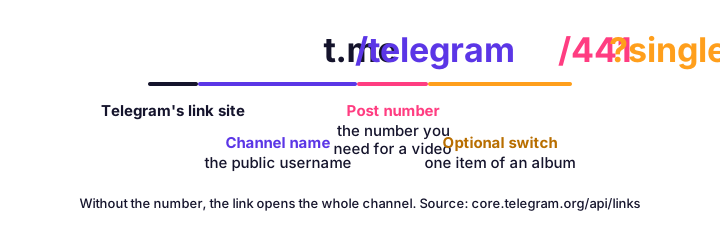
The number is the part people lose. It belongs to that one channel: post 441 of one channel is not post 441 of another. A link that stops after the name, like t.me/telegram, is the channel, not a post. Copy the link from the post's menu, and the number is always there.
Telegram's page lists more things a link can carry after a question mark. Here are the ones that matter to a reader:
| Part | What it does | Plain meaning |
|---|---|---|
?single | For albums: a link to one item of the album | Without it, the link is to the whole album |
?comment= | Points at a comment under a channel post | The number is the comment's message in the discussion group |
?t= | The time to start playing the video | Seconds (123), minutes and seconds (10:23) or 1h23m10s |
?thread= or an extra number | The topic or thread inside a group | Used by groups that have topics or threads |
None of these changes which post you reach. They change what Telegram does after it opens the post.
A public link has the channel's name in it; a private link has t.me/c/ and a number. Telegram's documentation gives private links the form t.me/c/<channel>/<id>, and says the channel field is required for them.
The difference decides who can use your copy:
If a group has no public name, its message links will always be the t.me/c/ kind. You can give a group a public name in its settings, but that also makes the group open to anyone who finds it, so decide that for the group's sake, not for one link.
Our downloader accepts a public post link in every form below and refuses the others with a message that says why. We pasted 15 forms into our engine's link check on 22 November 2026, using a real public post from the Telegram News channel, t.me/telegram/441.
| Link form | Result |
|---|---|
| t.me/telegram/441 | Read as the post |
| telegram.me/telegram/441 | Read as the post, turned into the t.me link |
| t.me/s/telegram/441 (the web preview form) | Read as the post, turned into the t.me link |
| t.me/telegram/441 without https:// | Read as the post |
| t.me/telegram/441?single | Read as the post, and ?single is kept for albums |
| t.me/telegram/441?t=10 | Read as the post; the start time is dropped |
| t.me/telegram/441?embed=1 | Read as the post; the extra is dropped |
| t.me/telegram/441?comment=5 | Read as the channel's post, not as the comment |
| t.me/telegram | Refused: the link of a whole channel, not one post |
| t.me/s/telegram | Refused: the same reason |
| t.me/somebot?start=abc | Refused: it has no post number |
| t.me/c/1234567890/12 | Refused: a private channel or group, members only |
| t.me/+AbCdEfGhIjKlMnOp | Refused: an invite link, not a post |
| t.me/joinchat/AbCdEfGhIjKl | Refused: an invite link |
| tg://resolve?domain=telegram&post=441 | Refused: not a web link |
Then we read the public post itself. The engine returned its title, the channel's name (Telegram News) and a cover picture. Two lessons follow. First, the number matters more than the host: telegram.me, the preview form and a missing https all lead to the same post. Second, a link with ?comment= goes to the channel post, which is what Telegram's rules say the username and id point at, so copy the comment's own link if you want the comment.
The tg:// form is the one Telegram's apps use inside your phone. If you ever see one, the t.me version carries the same domain and post number, so swap it by hand: tg://resolve?domain=telegram&post=441 is t.me/telegram/441.
A copied link fails for a few clear reasons, and each has a quick check. We list them in the order we meet them.
| What you see | Why | What to do |
|---|---|---|
| The link opens the channel, not the post | The number is missing | Copy it again from the post's menu |
| "Post not found" in the browser | The post was deleted, or the number is wrong | Check the number against the channel |
| A friend cannot open it | It is a t.me/c/ link to a private chat | Share the public post, or invite them |
| The page shows a grey box that says "Media is too big" | Telegram keeps that file for its apps | Read why and save it in the app |
| The post plays in the app, but no tool reads it | The channel is private or the media is app-only | Nothing outside Telegram can fix this |
The grey box is not a link problem. On 30 October 2026 we found it on 8 of 52 public video posts, and our Telegram video downloader page explains it. For other messages from a download, our list of every error message and its fix names each one.
A channel's owner can switch on Restrict Saving Content. Telegram describes the setting as one that limits users' ability to forward messages and save content, and it sits under the channel's Info page, in Group or Channel Type. It does not hide the post's link: the link of a public post is still a link, and you can copy it.
What it means for downloads is simple. We read only the page Telegram shows to any visitor with no account, and we never sign in to anyone's Telegram. We do not offer bots, scripts or screen tricks that get around a channel's choice, and a private post's link will always be refused, as the table above shows. The people who post the videos keep their copyright, so keep a saved video for your own use and ask before you post it again. This is general information, not legal advice.
Once you have a public post link, saving its video takes one paste. Open the Telegram video downloader, paste the link and press Download. For many links, put one per line in the bulk downloader. If you are on an iPhone, the four taps from Safari to Photos put the file in your camera roll.
Everything about the link rules comes from Telegram's own pages, read on 22 November 2026: its deep links documentation, its blog post on protected content, and the text files of the Desktop and Android apps. The table of link forms is our own test, made on 22 November 2026 from our server with no Telegram account. The iPhone wording is the one claim we did not read in an app's own file. Telegram changes its apps often, so a menu may read a little differently on your phone.
Open the post, then use Copy Post Link (Telegram Desktop, in a channel) or Copy Link (the Android app, and Desktop's general menu). Telegram says Link copied to clipboard. Paste it anywhere: a public channel's link looks like t.me/name/123 and ends with the post's number.
The same way: the link is built from the channel's public name and the post's number, so you can also type it yourself, as t.me/ plus the name, a slash and the number. That only works for channels and groups that have a public name.
Three causes are common. The link is a t.me/c/ link to a private channel and you are not a member. The post was deleted, and Telegram's web page says the post was not found. Or the link is cut short and has no post number, so it opens the channel, not the post.
It marks a post in a private channel or group, one with no public name. Telegram's link documentation gives private links the form t.me/c/ channel number / post number. Only members can open them, so a friend who has not joined cannot use your copy.
It points at one picture or video inside an album. Telegram's rules say a link without it is a link to the whole album, and a link with it is a link to that single item.
Yes. Restrict Saving Content limits forwarding and saving of the media, as Telegram describes it. The post's link is still a link. A downloader still cannot read a private channel, and we do nothing to get around the restriction.
For a public channel, yes: the link opens a Telegram web page in any browser, with a button that opens the post in the app. For a private t.me/c/ link, no, because only members can open it.
Use the same menu on the message. Telegram Desktop's text file lists a separate wording for groups, Copy Message Link. In a group with a public name the link is t.me/name/123. In a private group it is a t.me/c/ link.
Vimeo has a Download button, but only when the owner turns it on. Where to find it, why it is missing, and what to do when it is. Checked 21 Nov 2026.
Pinterest shows a 736-pixel copy but keeps a bigger original. We measured 30 public Pins: how much bigger, when it is not, and why the address can fail.
VK has no download button. Copy a public vk.com or vkvideo.ru link and paste it: which VK link shapes work, what the minus sign means, and what is off limits.
Most LinkedIn carousels are PDF files. Three ways to save one, what each gives you, and why a carousel made of photos is a different case.
First published . Written and checked by the Raptor Downloader team (how we write and check guides). Download only videos you own or have permission to use. Terms · Copyright and takedowns