More sites
Pinterest image original size: what 736x and /originals/ really give you
Pinterest shows a 736-pixel copy but keeps a bigger original. We measured 30 public Pins: how much bigger, when it is not, and why the address can fail.
Vimeo has a Download button, but only when the owner turns it on. Where to find it, why it is missing, and what to do when it is. Checked 21 Nov 2026.
Open the video on vimeo.com, not in an embed, and press the Download button under the player. It shows only when the owner allowed downloads, which needs a paid Vimeo plan. Pick a file size, then save it. No button means the owner turned it off, so ask them for the file.
You want to save a Vimeo video, and you cannot see how. Many pages tell you Vimeo has no download button. That is wrong: Vimeo has one, and the owner of each video decides whether it shows. This page explains where to find it, the three reasons it goes missing, and what to do in each case. It also says plainly that Raptor Downloader does not handle Vimeo links today.
Vimeo's own help says to select the Download button below the video player on the video's page. A window then shows several file sizes. You press the download icon beside the version you want and save the file.
Three details trip people up:
vimeo.com/ and a number. A video playing inside someone else's website is an embed, and an embed has no download option.Vimeo does not name resolutions in that window. It shows file sizes and tells you to pick a higher-quality file for presentations and a smaller one for quick playback or sharing. So the biggest file is usually the best picture, but the page does not promise it.
When there is no button, one of three things is true. Vimeo's troubleshooting page names all three. This table puts them in the order to check them.
| Reason | How to tell | Who can fix it | What you do |
|---|---|---|---|
| You are watching an embed | The video sits inside another website | You | Open the video on vimeo.com and look again |
| The owner turned downloads off | The video's own page has no button | Only the owner | Ask the owner for the file or to allow downloads |
| The owner is on a Free plan | The owner's videos never show a button | Nobody, unless the owner upgrades | Ask the owner for the file |
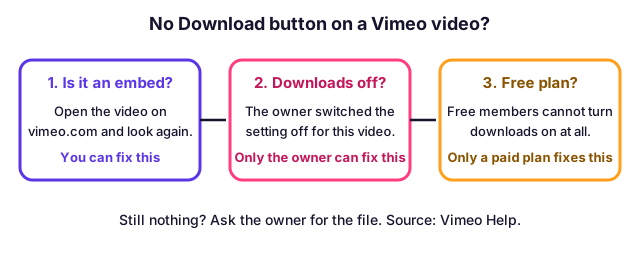
An embed is the cheapest cause to rule out. Vimeo says download is available only when you watch on the video's page at vimeo.com. Its page on turning downloads off adds that there is currently no way to make videos available to download from the embedded player. So even an owner who allows downloads cannot give them to people watching in an embed. Find the video's own page, often by pressing the Vimeo logo in the player, and look for the button there.
Vimeo lets the owner switch the setting per video or for every video at once. In the Library, the owner opens the video, chooses Share, and uses the downloads switch under Viewer permissions. For all current and future videos there is an upload defaults tab in the account settings. Because the setting is easy to change and many people leave it off, a missing button is common. You cannot turn it on for someone else's video.
Vimeo says Free members cannot enable downloads on their videos. They also cannot download videos from their own account. If a creator is on a Free plan, no viewer will see the button on any of their videos, whatever they would like. This is why two videos on Vimeo can behave differently: the plan of the person who uploaded each is what matters, not yours.
You have three honest routes, and the first works best.
What we do not suggest is a downloader browser extension or a "migration" app. Vimeo says such tools may ask for broad account access, such as editing or deleting your videos or changing their privacy settings, and that the access lasts until you cancel it. Vimeo also says it does not support transfers that fail or stop partway when an unauthorised tool was used.
We wanted to know whether a link downloader could save a Vimeo video that has no button, so we tested it. On 21 November 2026 we asked our download engine (yt-dlp 2026.10.26) to read two public Vimeo videos. Both times Vimeo answered that its web client works only when logged in. Neither video had a download button we could use, and the engine had no way in without an account.
We never sign in to anyone's account, and we do not ask for passwords or cookies. So Vimeo is on our list of sites we do not offer, and this page tells you the route that does work. The same rule is why we do not show a Vimeo box on the website. This can change if Vimeo's side changes; we will update this page when it does.
If you try a Vimeo link on another downloader, you are the one who decides whether to trust it with your account. Our advice is the same as for any site: read why a download fails before you give a tool a password.
If you uploaded the video, you have an easier job, but a paid plan is needed. Vimeo says free members cannot download from their own account.
As the owner you see the Download button on your own video page whatever the viewer setting is, so a button you see does not prove viewers see one. Open the video logged out, or ask a friend, to check.
| Question | Answer from Vimeo |
|---|---|
| Can I download many videos at once? | No. Download one at a time from each video's settings page |
| Is my original upload kept? | Only with a paid plan and Keep source video files turned on before you upload |
| Can I download from an embedded player? | No |
| Can a Workspace member change downloads? | Workspace videos are managed by a Workspace Admin |
Vimeo's pages are not fully consistent here. One article says downloading your own video is available on all plans, while another says Free members cannot download from their own account. We followed the stricter reading in our answers. If you are on a Free plan and see no button on your own video, upgrading or contacting Vimeo Support is the way to settle it.
If you want to keep a safe copy of everything you post, do it as you upload. Keep the original file on your own drive and, on a paid plan, turn on Keep source video files first. Once a source file is deleted, Vimeo says it cannot be recovered.
A turned-on Download button gives you a copy for the use the owner had in mind: watching, a class, a presentation, a review. It does not hand over the copyright. Vimeo describes the setting as permission to save a copy while the creator keeps the rights, so do not re-upload, sell or edit the film without asking.
Our scope is the same everywhere. We help you save public videos you may legally save. We do not help with passwords, private videos, paid courses or anything with copy protection. Vimeo supports password-protected and private videos, and the owner chose those settings for a reason. For the wider rules, see is it legal to download videos.
vimeo.com, logged in if Vimeo asks.Open the video on its own page at vimeo.com and press the Download button under the player. A window lists file sizes. Press the download icon beside the one you want and save the file. If there is no button, the owner has not allowed downloads.
Vimeo lists three causes. The owner turned downloads off, the owner is on a Free plan and cannot turn them on, or you are watching in an embedded player on another website. Only the first two are the owner's choice. The third you can fix yourself by opening the video on vimeo.com.
No. Vimeo says there is currently no way to make videos available to download from the embedded player. Open the video's own page on vimeo.com instead. If the button is there, the owner allows downloads.
Not through Vimeo. The Download button exists only when the owner allows it. Vimeo's help pages say its Terms prohibit unauthorised scraping and getting around download restrictions. If you need a copy, ask the owner to send the file or turn downloads on.
Not today. On 21 November 2026 we tried two public Vimeo links and Vimeo asked for a logged-in account both times. We never log in to anyone's account, so we do not offer Vimeo. The official button is the route that works.
Yes, on a paid plan. Open the video in your Library, open the Share menu on its settings page, choose Download and pick a version. Vimeo says the owner sees the download button on their own video whatever the viewer setting is. Free members cannot download from their own account.
No. Vimeo says there is currently no option to download several videos in bulk from your Library. You download them one at a time from each video's settings page.
Only if you kept it. Vimeo keeps the original upload only on a paid plan with the Keep source video files setting turned on before you upload. Without that setting the source may have been deleted for good, and the download offers its own versions.
Pinterest shows a 736-pixel copy but keeps a bigger original. We measured 30 public Pins: how much bigger, when it is not, and why the address can fail.
VK has no download button. Copy a public vk.com or vkvideo.ru link and paste it: which VK link shapes work, what the minus sign means, and what is off limits.
Most LinkedIn carousels are PDF files. Three ways to save one, what each gives you, and why a carousel made of photos is a different case.
Download any archive.org video from its Download Options box, and know which file to take: H.264, Ogg, 512Kb or the original, measured on 43 items.
First published . Written and checked by the Raptor Downloader team (how we write and check guides). Download only videos you own or have permission to use. Terms · Copyright and takedowns